Same promise, different companies
Put Rebuild and Axiom side by side, and the promise reads the same: AI that produces your Xactimate estimate. Look at how each one actually gets there, and at the companies as a whole, and you'll realize one of them is not like the other.
There are competitors of Axiom that we respect, and hell, we even like. Rebuild is not one of them.
What we don't like is when someone enters our industry and basically thinks we are dumb.
Who built it
Rebuild is a New York company founded by Alex Toporek. The story is that Alex grew up around his father's restoration business and built the product to fix the problems there. The press release calls Rebuild "built by operators with firsthand experience in restoration," but the lead investor's write-up describes a team from 25madison, DoorDash, Block, Zillow and Meta.
Here's what's actually true. His father is Michael Toporek, founder of Brookstone Partners, a Manhattan private equity firm that rolls up restoration companies. In 2020, Brookstone bought into Hudson Valley DKI, a restoration company built by the Ferrante family. It was renamed Advanced DRI, Michael sits on its board, and Brookstone started buying other restorers with it.
Rebuild's About page credits Angelo Ferrante, a 40-year construction veteran, as the estimator who helped build the first version. An Angelo Ferrante was president of Advanced DRI. Advanced DRI's logo is now in the row of restorers on Rebuild's homepage.

So the family restoration business is a portfolio company. His father owned it the way a fund owns things. Alex is in restoration the same way my dad is a veteran because he was in the war on drugs.
I know "my daddy was in restoration" reads like killer credentials, so I won't come down too hard on it. Let's move past it.
Axiom's cofounders are two restorers who have exited for multiple millions and have been building AI for the last five years. Rebuild announced $13 million in new funding on September 15. Money buys a bigger sales team. It doesn't buy a restoration career.
Minutes vs. hours
Both companies promise Xactimate estimates in minutes. You can watch Axiom do it: 27 photos in, a $12,253 estimate out in 193 seconds.
Rebuild means hours. Their homepage says seconds. Their estimating page says under two minutes. Their About page says cycle times are under a day. That's three answers on one website.
Here's how the job we reviewed went. The field tech entered the damaged materials and dimensions in Rebuild's app, answered its follow-up questions, and hit submit. Three to twelve hours later, the estimate arrived. Ask on the demo if an estimate can really appear in two minutes, then ask them to show you. I'd like to hear that answer.
The Verisk badge
Rebuild's estimating page says "as a Verisk ecosystem partner," and there's a Verisk logo in the footer promising an Xactimate integration.

Verisk publishes its partner directory. It has 184 entries. Albi is on it. DocuSketch, Encircle, magicplan and CapOut are on it. Getting on means a partner application, an NDA, and meeting Verisk's security, insurance and client-reference requirements. The badge is supposed to mean something.
I searched for Rebuild.
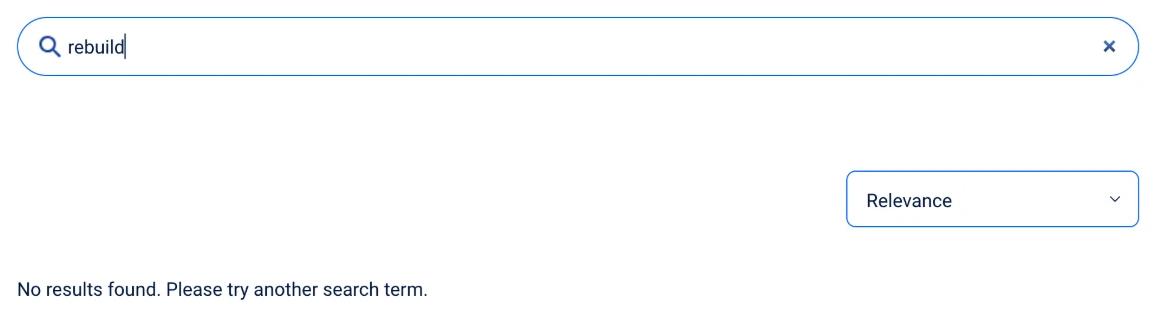
Then there's the integration itself. In the job we reviewed, nobody clicked export. Rebuild put the finished ESX into the contractor's Xactimate account and asked them to stay out of it while that happened. Whatever that is, it isn't a listing on Verisk's partner page, and it isn't one click.
Axiom's ESX opens directly in Xactimate. Download it, open it, and your estimator is already working in the file.
Who holds the file
With Rebuild, you enter the job through their app, submit it, and wait. You can't see the work between submit and delivery. Axiom starts from what your crew already collects: photos, measurements, notes, floor plans. It builds a draft room by room, and your estimator checks every room, dimension, code and quantity before anything leaves. Nothing is final until the estimator says so.
Your name is on the estimate. You should be the one who decides what goes on it.
Before you hand over your history
Onboarding for the Rebuild job started with a request for the contractor's estimate data. That's your line items, macros, price list habits and carrier requirements. Get answers in writing before you upload anything. Does it train a model? Does what it learns about your shop stay isolated from other customers? Who can open your files? Can you delete everything when you leave? Ask us the same questions.
A few more things that don't add up
Rebuild's homepage description calls it "the first software for restoration companies." Xactware has served this industry since 1986. Rebuild was founded in 2024.
The same site calls Rebuild the only AI estimating tool built for restoration. Verisk sells an AI Estimator inside XactRestore, its software for restoration contractors. Describe the job in plain language and it builds a structured estimate. Verisk is the ecosystem Rebuild says it belongs to.
Pricing isn't published. The only way to get a number is a demo. Axiom's is public: $899 a month for 15 estimates, or $2,500 a month for 50, with unlimited users on both.
Ask for the Verisk listing on that demo. Then run the same three jobs through both: a clean residential mitigation loss, one with missing or contradictory notes, and a complex reconstruction. Time the whole loop, from the first photo to a file your estimator would send.
Common questions
- Is Axiom an alternative to Rebuild?
- Yes. Both use AI to produce Xactimate estimates for restoration contractors. Axiom is software your team runs: you supply the documentation, review the draft room by room, and download a native ESX to import on your own schedule. In the Rebuild job reviewed here, the contractor submitted the job through Rebuild's application, waited roughly three to twelve hours, and Rebuild put the finished file into the contractor's Xactimate account.
- How long does Rebuild take to deliver an estimate?
- Rebuild's homepage says "Restoration estimates in seconds." Its estimating page says an estimate takes less than two minutes, and its About page says cycle times are less than a day. In the Rebuild job reviewed here, the estimate arrived three to twelve hours after the field tech hit submit.
- Does Axiom produce a real Xactimate file?
- Yes. Axiom exports a native ESX with rooms, dimensions, and line items in place. It opens directly in Xactimate and reprices on import against the price list for the job's own area code, so the estimate is never tied to somebody else's pricing.
- What does Axiom cost?
- Axiom is a monthly plan. Starter is $899 a month for 15 estimates, 15 PDF-to-Xactimate conversions and 15 comparative estimates; Pro is $2,500 a month for 50 estimates with the other two uncapped. Users are unlimited on both, so one account covers the whole estimating team, and allowances reset every month.
- Should an AI estimating vendor need my historical estimates?
- Some vendors ask for them to tune recommendations to how your shop writes. Before handing over an estimate library, get written answers on which files are required, whether the data trains a model, whether what the system learns about your shop is isolated, who can open the files, how long they are retained, whether they can be deleted, and whether that logic is exportable if you leave.